In this blog, we explain:
- What this message really means
- Why your webhook is not receiving real messages
- How to fix it step by step
- What Anjok Technologies does to resolve it
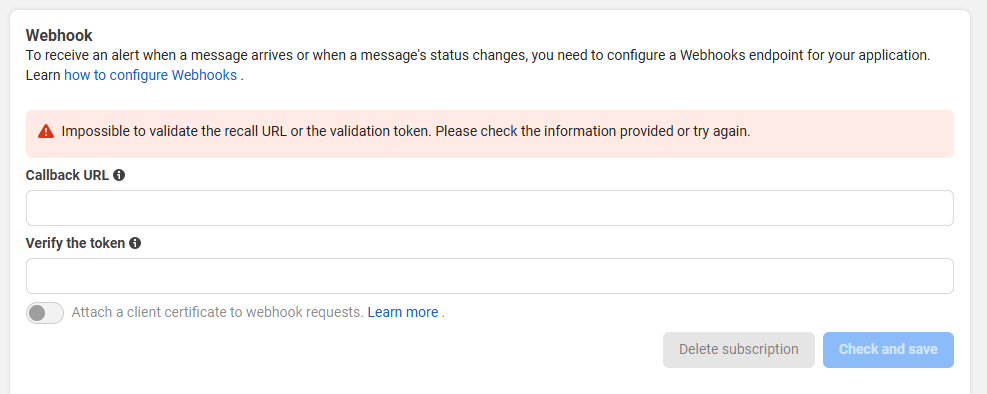
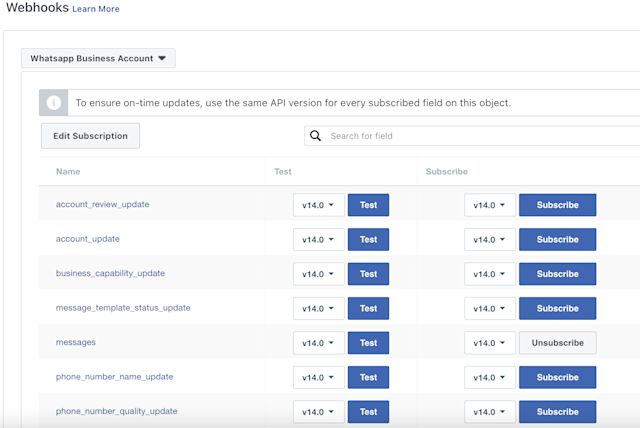
💡 What Does This Message Mean (Simple Explanation)?
Simple words 👇
When your Meta app is UNPUBLISHED:
- ✅ You will receive only test webhooks
- ❌ You will NOT receive real WhatsApp messages
- ❌ Even admin / developer messages won’t come
- ❌ No production data is sent to your webhook
This restriction is enforced by Meta Platforms.
🧪 What Are “Test Webhooks”?
Test webhooks are:
- Fake / sample events
- Sent manually from Meta Dashboard
- Used only to test webhook URL & response
They help you verify:
✔ Webhook URL is reachable
✔ Verification token works
✔ Server responds correctly
But they are NOT real WhatsApp messages.
❌ Why Real WhatsApp Messages Are Not Coming
This is the most common confusion.
Even if:
- You are app admin
- You sent message from same number
- Webhook verification is successful
👉 You will NOT receive real messages
👉 Until the app is PUBLISHED
This is expected behavior.
🔑 Key Rule You Must Remember
Unpublished App = Test Webhooks Only
Published App = Real WhatsApp Messages
There is no workaround for this.
✅ How to Fix This Issue (Step-by-Step)
STEP 1: Make Sure Your App Is Ready
Before publishing, ensure:
- Webhook verification is successful
- HTTPS webhook URL
- No PHP / server errors
- WhatsApp product added
STEP 2: Check Required Permissions
Your app should request ONLY:
- whatsapp_business_messaging
- whatsapp_business_management
Extra permissions = possible rejection.
STEP 3: Complete App Review (If Required)
In most WhatsApp Cloud API cases:
- App review is minimal
- Clear use-case explanation is enough
Explain:
“We use WhatsApp Cloud API to send and receive customer support and transactional messages for opted-in users.”
STEP 4: Publish the App 🚀
- Go to Meta Developer Dashboard
- Open your App
- Click Publish App
- Confirm publishing
Once published:
✅ Webhooks receive real WhatsApp messages
✅ Admin & tester messages work
✅ Production traffic starts
🧠 Very Important Notes (Avoid Confusion)
- Publishing app ≠ making it public on App Store
- Publishing means allowing production data
- Your app is still private to your business
- Only WhatsApp API is affected
❓ Common Developer Questions
❓ Will admin messages work before publishing?
❌ No. Even admin messages are blocked.
❓ Can I use test number instead?
❌ Test number works only for testing.
❓ Is this a webhook bug?
❌ No. This is Meta policy.
🏢 How Anjok Technologies Helps
Anjok Technologies helps developers and businesses with:
✔ WhatsApp Cloud API setup
✔ Webhook configuration
✔ App publishing & permissions
✔ App review explanation writing
✔ Fixing “no webhook data” issues
✔ Production-ready WhatsApp systems
Most webhook issues are solved within minutes once app is published.
📞 Contact Anjok Technologies
📱 +91 80729 70517
🌐 anjoktechnologies.in
👉 Ask for WhatsApp API Webhook & App Publish Support